Make OrangeBoard yours: the new Theme module and Ant Design
· 2 min read
OrangeBoard now lets every person on your team choose how the app looks, without changing anyone else's screen. The first new theme is Ant Design v5, built from Ant's official token package, alongside our default, OB HighVis.
What's new
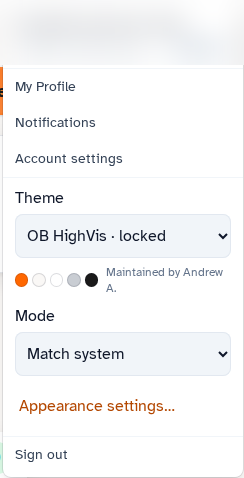
- Theme picker in the user menu. Theme is a dropdown, with Mode (light, dark, or match system) right beside it.
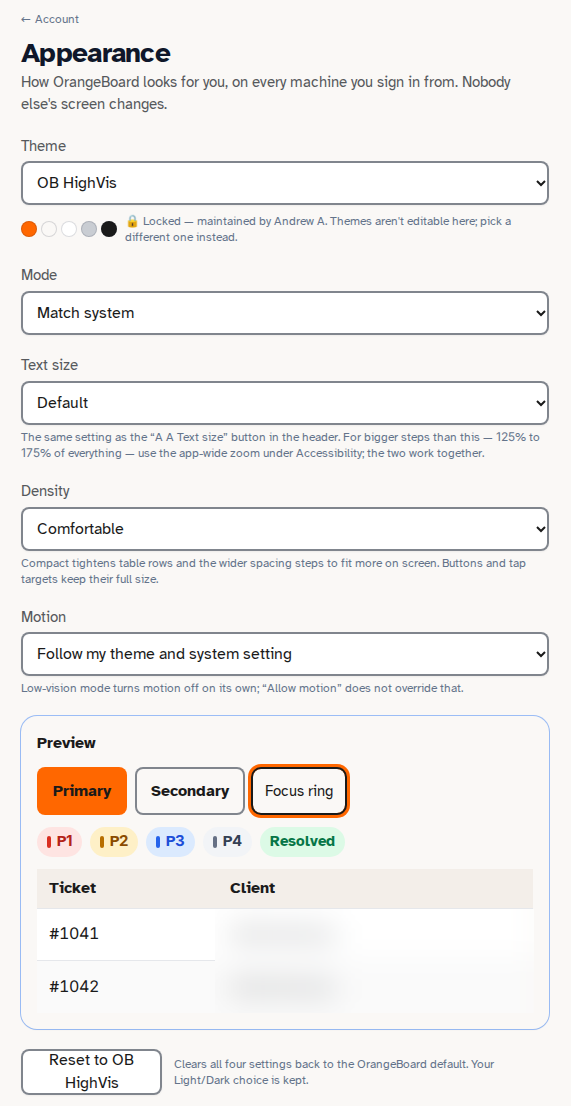
- My Profile > Appearance. Set Theme, Mode, Text size, Density and Motion, with a live preview and a one-click Reset to OB HighVis.
- Per-user and saved server-side. Your choice follows you to every machine you sign in from. Nobody else's screen changes.
- Keyboard friendly. Cmd-K includes theme commands, and the header Text size button stays in sync.
Ant Design, light and dark
Ant light re-skins the core workspace: Console, Queue, tickets, Clients, CRM, Projects, Quotes, Contracts, Billing, Approvals, Catalog, Invoices and Settings. Ant dark is clean, with no leftover OrangeBoard orange.

Why it matters
- Comfort and familiarity. Teams that live in Ant-based tools get a look they already know.
- Accessibility stays first. Contrast checks pass under both themes in every mode and text size, and the large-text toggle works on top of every theme.
- No surprises. OB HighVis stays everyone's default, and switching back is pixel-identical to the original look.
- Your brand is protected. Customer-facing emails, PDFs and quotes keep Standard Computer orange no matter which theme a user picks.
What's next
Material 3 is next, followed by Carbon, Primer and Fluent 2, one at a time.